
How CoPa works
Set up your family in about 10 minutes. Everything else builds from there.
Getting started
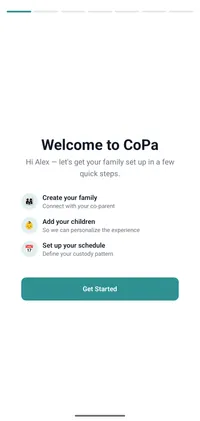
Sign up and set your schedule.
Create your CoPa account on iOS or Android. Add your kids, then choose your custody pattern from the built-in templates: 2-2-5-5, 3-4-4-3, alternating weeks, or build a custom rotation. Set transfer times and exchange locations for each day type.
Invite your co-parent.
Send the invitation by email or SMS from inside the app. Your co-parent gets a link to install CoPa and create their account. They're covered by your subscription, so they don't need a payment method. If they don't accept within 7 days, we send a single reminder.
Start using CoPa.
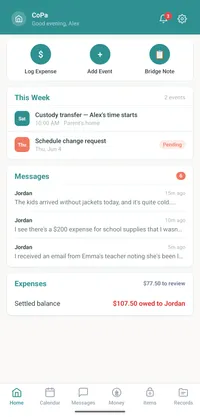
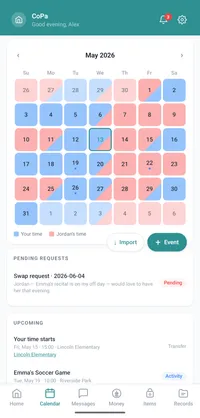
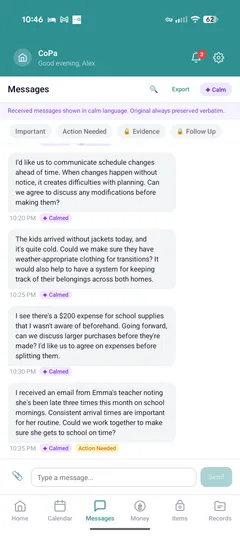
The shared calendar is live as soon as both parents are in. Schedule changes go through the request workflow: propose, approve, deny. Any approved change updates the calendar automatically. Messages go into a single shared conversation, timestamped and on the record. Turn on Calm Reading in Settings if you want incoming messages rewritten into neutral language.
Add Bridge Notes at handoffs.
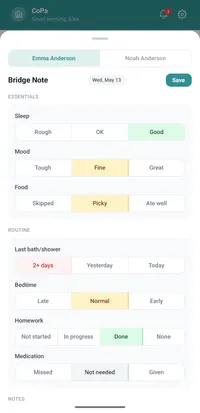
Bridge Notes are optional. They tend to be most useful once you've settled into a rhythm, usually the first week or two of regular use. At handoff, the parent doing dropoff fills in a short note: sleep, mood, food, anything new with health or school. The receiving parent sees it as a notification before pickup. The full history is viewable per child and exportable as a PDF.

SMS Relay. Optional add-on, $7/month.
SMS Relay gives your family a CoPa-issued phone number. Your co-parent texts that number; the messages arrive in your CoPa app. Your replies go back out as SMS. Every message, both directions, lands on the shared record.
When your co-parent won't install the app.
If your co-parent refuses, ignores, or stalls on installing CoPa, SMS Relay captures both sides of the conversation anyway. They text the CoPa number like they would any contact. They don't need to install anything, create an account, or even know how CoPa works. The record is the same as if they were on the app.
When you'd rather just text.
Even if both parents have CoPa installed, some people prefer texting. Enable SMS Relay and your co-parent can reach you through the CoPa number via SMS instead of opening the app. The messages still land on the shared record, Calm Reading still works on them, and everything is still exportable.
Same record, every time
Whether your co-parent uses the app or texts through SMS Relay, the shared record looks the same. Same fields, same timestamps, same export format. An attorney reviewing your CoPa record can't tell from the export alone how a message was sent.
Calm Reading, Bridge Notes, the private journal, the document vault, and the expense ledger all work regardless of whether SMS Relay is active.